Triangle Minesweeper gets two new color themes and clearer highlights
Play related games


Based on the feedback from our early players we’ve made two changes to Triangle Minesweeper, our logic minesweeper on a triangular board: you can now choose between three color themes, and nearby tiles have clearer highlights. We hope that these updates make the board easier to read and let you play in the colors you like.
Three color themes
A lot of Triangle Minesweeper players were saying that they love our game but the green and dark green board feels a little bit boring to them. We decided to add two more boring themes so there would be at least something to choose from.
You can now choose between three themes:
- Forest - the original green board.
- Tidepool - a new blue theme.
- Plum Dusk - a new purple theme.
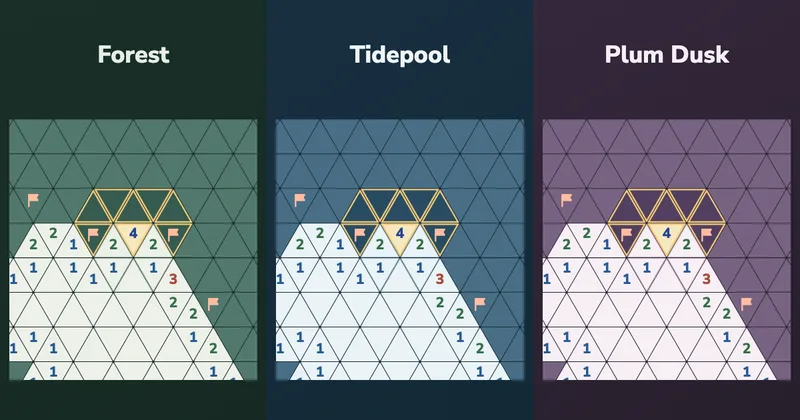
You can see all three of them in the picture at the top of this post. To change the theme, click or tap the small button next to the difficulty setting and choose a theme from the menu. The board colors will change instantly, the same way as in Hex Minesweeper.
Your puzzle, flags and hints will stay exactly the same. Changing the theme does not start a new game or count as a move, and you can switch it whenever you want and as many times as you want. We know that Hex Minesweeper players use this button quite a lot, so now you have the same choice in our triangular minesweeper game.
Clearer tile highlights
We also improved how the game shows the tiles next to the one where you hover the mouse. We don’t have anything like this in Hex Minesweeper, just because on the hex board it’s very easy to see the adjacent tiles. Okay, maybe not very easy, but at least it is easier than on the triangular board. On the triangular board, a tile in the middle of the field has 12 adjacent tiles - some share a side, while others touch only a corner. Which is a lot. So it’s important to at least give the player some visual help to see all of them at a glance.
Before, nearby closed tiles became lighter when you hovered over a number. It was very easy to confuse them with tiles that were already open, so you had to look very, very closely.
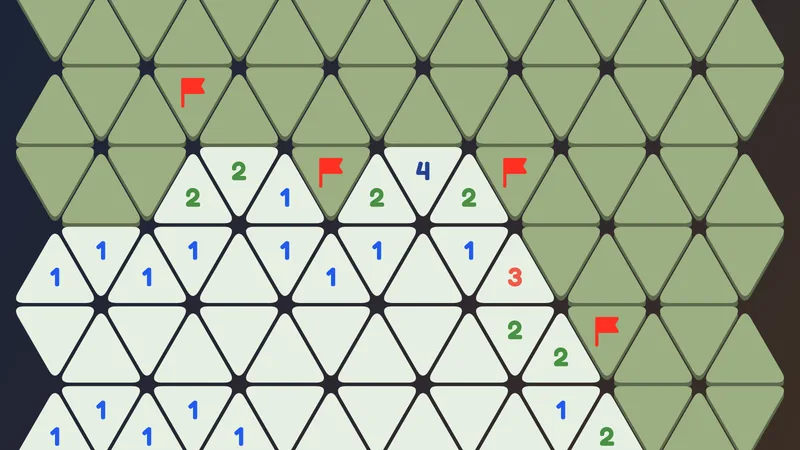
Now closed tiles keep their dark color and get a thick yellow outline when they touch the selected number. It works the same way for flagged tiles. Open tiles get a thin outline, so it’s easy to see the difference between open and closed. In the picture at the top, look at the tiles around the number 4.
The yellow outline only shows which triangles are neighbors. It doesn’t tell you where the bombs are, and of course you still need to use the numbers to solve the puzzle. But we think that this improvement makes the game easier to understand. It’s easier to see where you stand, and it’s easier to see which tiles you should take into account.
One more hint that, as we discovered, not all of our players know. If you play on a phone and want to be sure that you will not open something by accident, you can choose Inspect mode before tapping a number. In that mode tapping never opens a tile. So you can investigate the board, tap on any tile and see its neighbors without being worried about opening anything nearby.
Try the new themes
Play Triangle Minesweeper free in your browser and try all three themes. Every board can be solved with logic alone, so whichever color you choose, you never have to guess.
If you enjoy logic minesweeper puzzles, you can also play Hex Sense and Hex Minesweeper. Both games offer a different way to enjoy puzzles based on Minesweeper rules.
Which theme do you like the most? Or is there a color that we are missing? Please join our Discord server and tell us, we read everything there.
Written by
YesPuzzles